Steam Workshop for Developers: Setup, Rules and Real Results
How to add Steam Workshop to your game: ready-to-use vs curated, ISteamUGC setup, legal terms, moderation, paid mods history and real sales results.
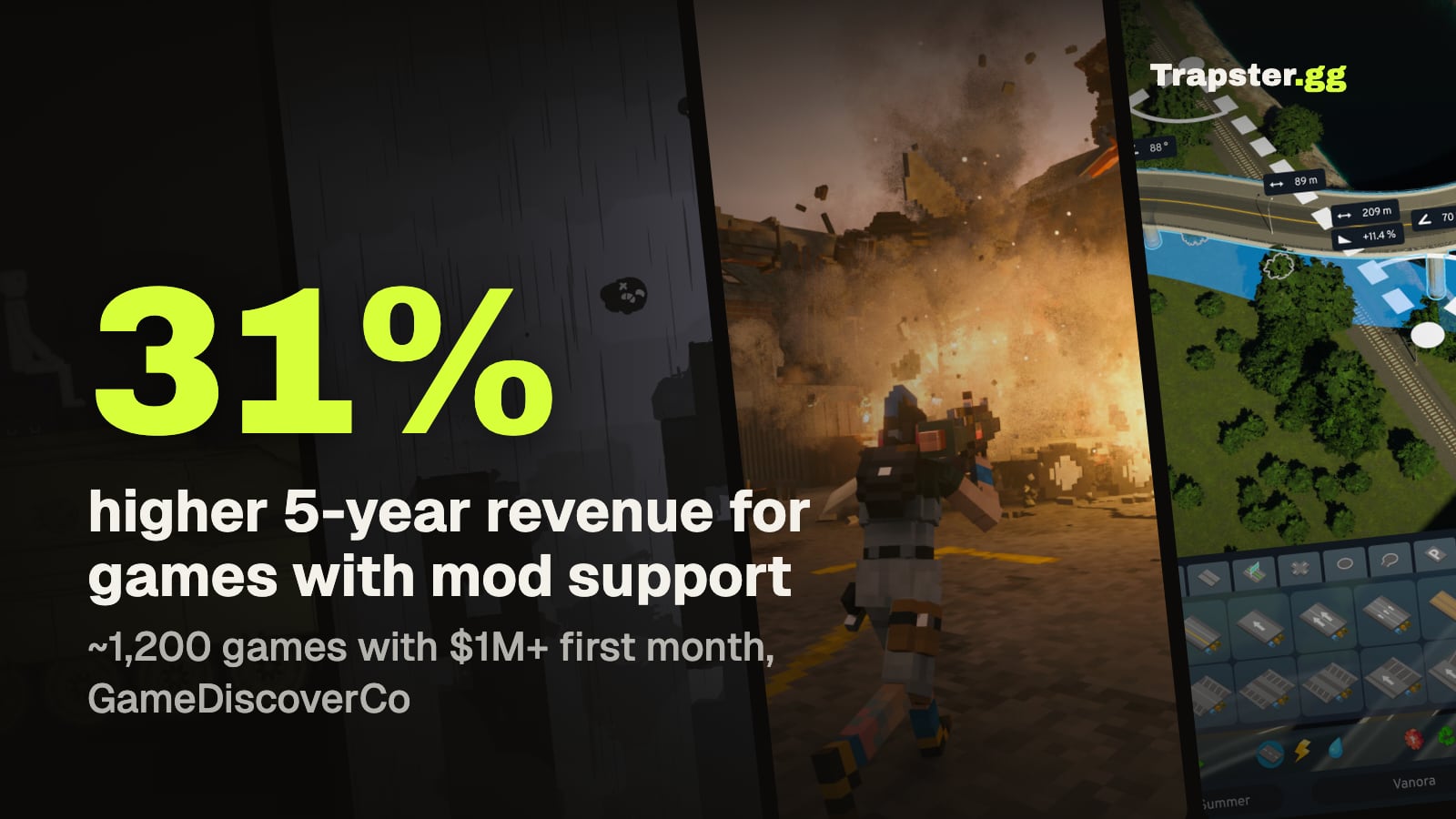
Short answer: Steam Workshop is Valve's free hosting, browsing and auto-download system for player-made content, and you add it to your game through the ISteamUGC API in Steamworks (Steam Workshop overview). You pick one of two models: a "Ready-to-use" Workshop where anyone uploads and players subscribe with no approval step, or a "Curated" Workshop where you approve each item before it goes into the game. Integration means building an upload path and making your game load subscribed folders, which Valve itself rates as "fairly advanced." Mod support correlates with a longer tail: in a 2025 GameDiscoverCo and mod.io analysis of about 1,200 Steam games that made over $1M in their first month, titles with official mod support earned 31% more revenue after five years. For a small team it pays off when your game is a sandbox, builder or systemic game that players already want to modify, and when you launch the Workshop as a marketing beat rather than a quiet patch note.
What Steam Workshop is, per Valve
Valve's implementation guide describes Workshop as "a system of back-end storage and front-end web pages that make it easy to store, organize, sort, rate, and download content for your game." In practice that gives you four things you would otherwise build yourself:
- File hosting and CDN delivery for every mod, map or item.
- A browse page on the Steam Community with ratings, comments, collections and search.
- Automatic downloads and updates through the Steam client. When a player launches your game, Steam updates your depots first, then updates existing Workshop items, then launches the game and downloads new subscriptions in the background.
- A legal and payment layer: authors accept Valve's terms, and for paid items Steam handles payouts and tax withholding.
It does not give you the modding itself: your game must read the content and players need tools to make it. Valve's overview page puts the level of integration at "fairly advanced, but depends on your usage," because you need an upload path in your game or a separate tool, plus a way for the game to load downloaded content from disk.
Workshop is also not a niche feature. Valve's Mods on Steam page says the Workshop offers player-created content across "over 100 games and software titles," and reminds players that mods require owning the base game. Every mod is a reason to own your game.
Ready-to-use vs curated Workshop
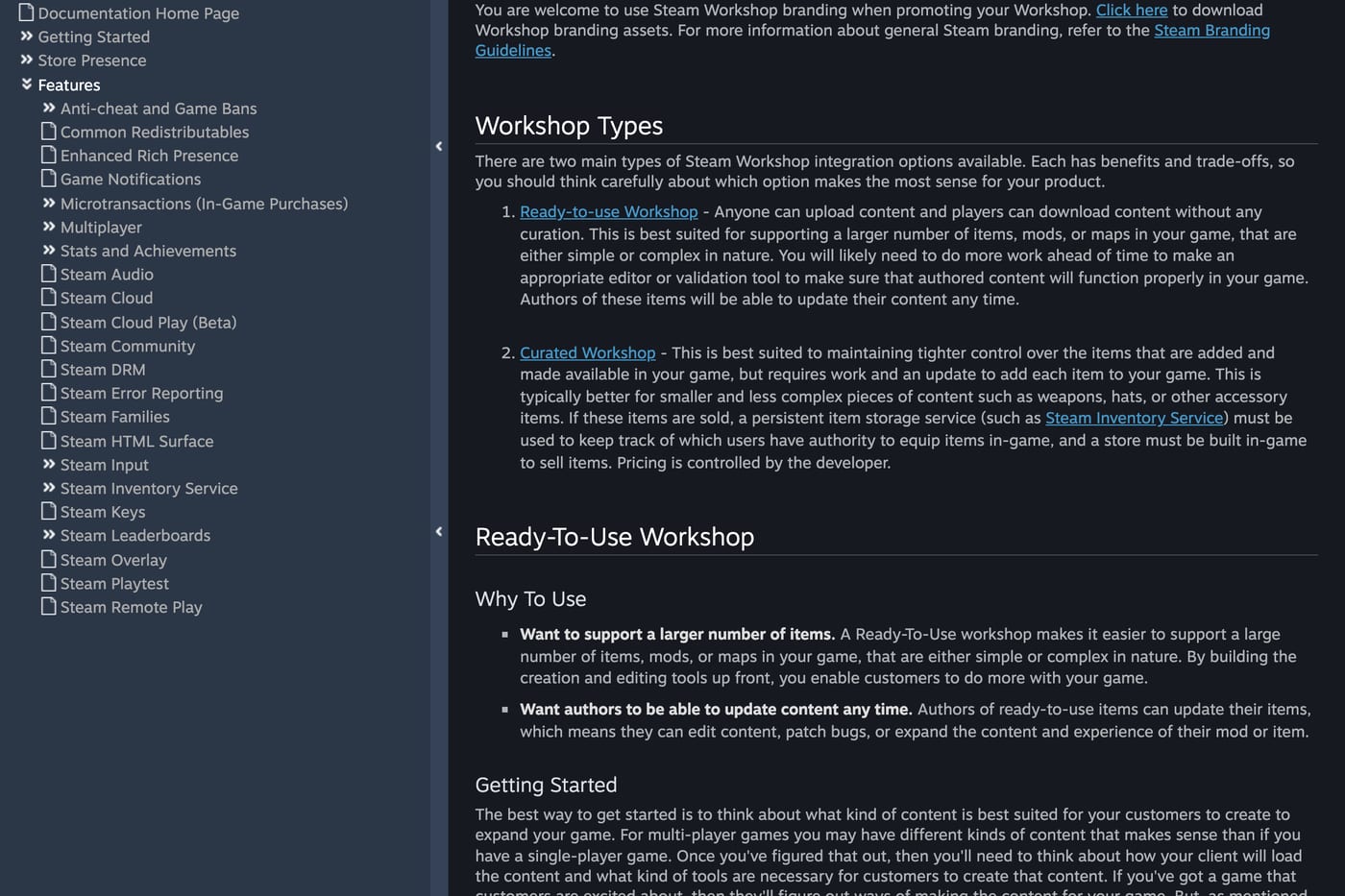
This is the first real decision. Valve says each model "has benefits and trade-offs, so you should think carefully about which option makes the most sense for your product."
| Ready-to-use Workshop | Curated Workshop | |
|---|---|---|
| Who decides what goes live | Nobody. Anyone uploads, players subscribe directly | You approve each item after community voting |
| Best for | Maps, levels, mods, large volumes of content, from simple to complex | Small items such as weapons, hats, cosmetics |
| Who updates items | Authors, any time | Authors (direct to client) or you (download and build into your depots) |
| Work up front | Editor or validation tools so content actually runs | Uploader form, plus an item server or Steam Inventory Service if items are sold |
| Work per item | None | At least a small amount to accept each item |
| Typical indie use | Most indie examples in this guide: Teardown, Noita, Brotato, Rain World | Rare for indies. Classic examples are Valve's own games |
For curated items, Valve lists your distribution options: sell them in an in-game store (via Steam Microtransactions or the Steam Inventory Service and its Item Store), give them as random drops, bundle them as DLC, or add them free for everyone. If you bundle as DLC, Valve is explicit that you must work out payment with each author yourself, "either a one-time payment (easier) or ongoing royalty percentage," and handle any tax forms. Valve also warns that adding items free for everyone "probably won't motivate a very high level of quality of submission."
For a small team making a single-player or co-op game, ready-to-use is the practical choice. Curated Workshops suit live games with an item economy.
How to add Steam Workshop to your game
The steps below follow Valve's implementation guide. Read it in full before you start, because a few settings are easy to miss.
- Decide what players can make. Valve's advice is to think about which content suits your game, then how the client will load it and what tools creators need. If you want deep modding, Valve suggests you "release as much of your own development tools as possible."
- Set a Steam Cloud quota. Workshop preview images are stored with Steam Cloud, so set a per-user byte quota and file count on the Steam Cloud settings page and publish.
- Enable the API. On the Workshop configuration page, check "Enable ISteamUGC for file transfer," save and publish.
- Build the uploader. Call
CreateItemwith your game's App ID, thenStartItemUpdate, theSetItem...calls (title, description, tags, content folder, preview), andSubmitItemUpdate. Valve notes a Workshop item "is a representation of a folder of files," and that "there is no method to cancel the item update and upload once it's been called." - Handle the legal agreement in your UI. "Workshop items will be hidden by default until the contributor agrees to the Steam Workshop Legal Agreement." Check
m_bUserNeedsToAcceptWorkshopLegalAgreementafter creating and after updating an item, then open the item page in the Steam overlay so the author can accept. - Load subscribed content. Use
GetSubscribedItems,GetItemStateandGetItemInstallInfo, and listen for theItemInstalled_tcallback. Valve's overview suggests your client "first check for the Steam user's list of subscribed files and then load the corresponding folders," and that you give modders a local staging folder to test from. - Set visibility. New Workshops are not public by default. The four states are Developers Only, Developers & Testers, Customers & Developers, and Everyone. "Everyone" requires a finished Workshop checklist, including branding, title, description and at least one public item.
You do not need to write C++ to do this. Community wrappers expose ISteamUGC for the common engines, for example Steamworks.NET for Unity and GodotSteam for Godot.
Two talks linked from Valve's docs are worth watching before you scope the work:

The legal terms behind every Workshop item
Mod authors do not sign anything with you. They accept the Workshop terms inside the Steam Subscriber Agreement, section 6.B, "Content Uploaded to the Steam Workshop." The parts that affect you as a developer:
- Free by default. Workshop contributions "are in principle made available to Subscribers for free." Paid items are the exception, and revenue sharing for them is defined in "App-Specific Terms," not in the agreement itself.
- App-Specific Terms. Your Workshop can add terms that "supplement or change" the standard ones. Put your content rules there and link them from your Workshop page.
- Removal. Valve "reserves the right, but not the obligation, to restrict or remove Workshop Contributions for any reason." An author can remove their own item, but players who already have a copy keep their rights to it.
To ship a community mod as official DLC, you negotiate payment with the author directly, in writing. See our DLC strategy guide for how paid add-ons fit your release plan.
Moderation: your tools and the real risk
As the developer you get the same moderation tools as any Community Hub admin. Valve's Community Moderation docs list them:
- Hide as incompatible. Removes an item from your game's hub. For Workshop items, the author is notified that the item will "no longer be associated with the hub, nor available in the game."
- Hide as inappropriate. Blurs the preview for players who opted out of violent or sexual content.
- Ban. Reserved for items that violate the Subscriber Agreement, such as offensive content, pornography or "stolen Workshop items." The author gets an email, and the item stays visible only to them.
- Account bans. A user banned from your hub cannot upload Workshop items to it.
Those tools handle bad content. They do not handle bad code, and that is the risk to plan for if your mods can run scripts.
Example: People Playground, February 2026. A malicious mod for the physics sandbox spread by uploading itself over other authors' Workshop items. The developer wrote that it "reset your preferences, deleted contraptions, and reset your achievements," closed the Workshop, and patched the game to block the mod (Security Update, Feb 3 2026). When the Workshop reopened, mods "no longer auto-update" and need manual approval when their contents change (Updates and Workshop, Feb 6 2026). The developer's lessons included "I sure need more moderators." For context, People Playground's Workshop lists close to 800,000 items, so one bad upload had a lot to infect.
For a small team: sandbox mod scripting, limit which files mods can overwrite (Valve says your tools can "restrict and validate the content being submitted"), and recruit community moderators early.
Paid mods and the curated Workshop: a short history
Paid Workshop content started with Valve's own games. By January 2015, Valve said Workshop creators had earned over $57 million since 2011, split across about 1,500 contributors, from items sold in Valve games such as Dota 2 and Team Fortress 2 (Game Developer, Jan 2015). That same month Valve opened paid curated Workshops to outside games, starting with Chivalry: Medieval Warfare and Dungeon Defenders: Eternity.
In April 2015 Valve tried paid ready-to-use mods in Skyrim's Workshop. Creators could set prices and players had 24 hours to request a refund if a mod did not work (80 Level, Apr 24 2015). The split drew most of the anger: modders received 25%, Valve 30% and Bethesda 45%, and a petition against paid content passed 133,000 signatures (CSO Online, Apr 28 2015). Valve pulled the feature after a few days and refunded buyers, saying "it's clear we didn't understand exactly what we were doing" (Engadget, Apr 27 2015).
The current docs still describe paid items in a ready-to-use Workshop, with Steam handling "payments to the authors, payments to the game developer, and any necessary tax withholding." The lesson from 2015: switching an established free modding community to paid overnight burns trust. If you want paid content, design it in from the start and keep a generous free path.
Does mod support actually sell more copies?
The best public data is the GameDiscoverCo and mod.io analysis from September 2025. It tracked about 1,200 Steam games over five years, of which close to 20% had official UGC support (Workshop, mod.io, CurseForge or a publisher's own platform). Compared with games without it, UGC games had:
- 8% more revenue in year one and 31% more after five years.
- 75% higher concurrent players after two years and 115% higher after five.
- 105% higher total revenue per DLC, which argues against the fear that free mods eat paid DLC.
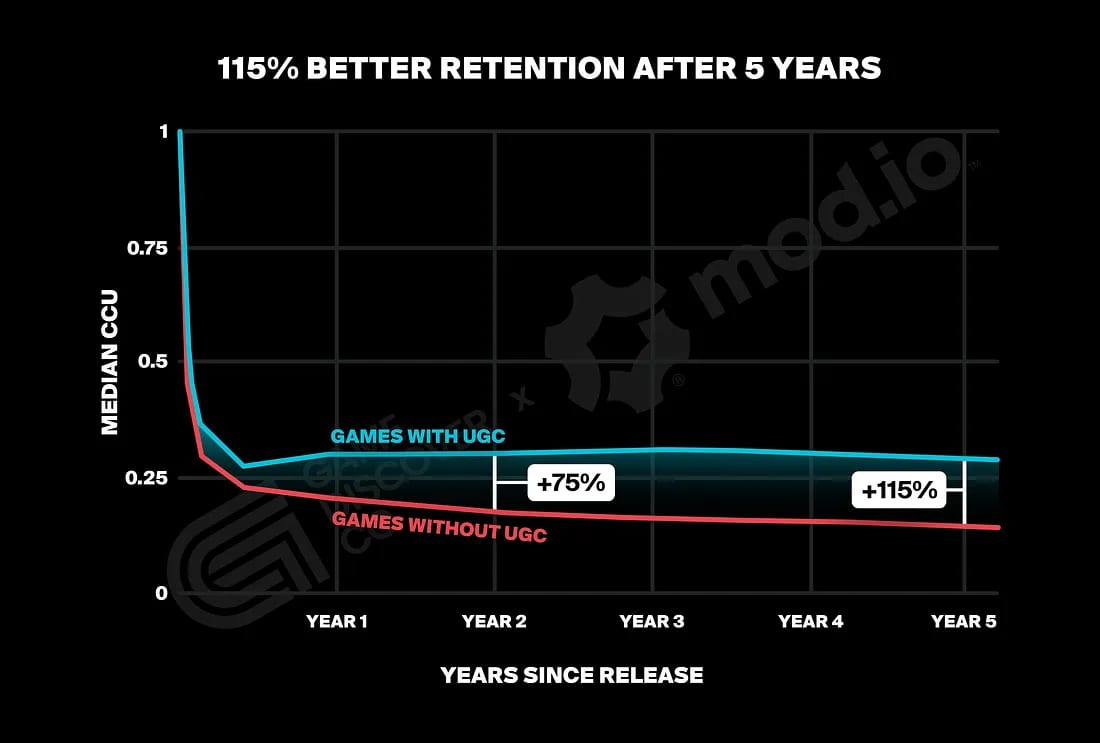
Read it carefully. The sample only includes games that made more than $1M on Steam in their first month, so it describes hits, not typical indies. The authors also flag that games which allow UGC "may be of a genre that naturally has a better long tail." Mod support often follows popularity as much as it causes it.
Developer reports point the same way, with the usual single-source caveats:
| Game | What they did | Public outcome |
|---|---|---|
| The End Is Nigh (2019) | Added Workshop alongside a Steam daily deal | Co-creator Tyler Glaiel reported full-price sales "up by around 1000%" after the deal ended. One developer's report |
| Defender's Quest (2013) | Launched Workshop support, then ran a Steam Workshop sale | Lars Doucet called it "one of our largest spikes ever" in his long tail post, without publishing figures |
| SnowRunner (Saber) | Official mod support via mod.io | Players using mods were "2.4 times more likely to buy official DLC," per the studio in GameDiscoverCo |
| Baldur's Gate 3 (Larian) | Official mod support in 2024 | Larian reported a 20% rise in daily active users across platforms, same source |
The End Is Nigh's Workshop lists only about 70 items today, so the sales jump Glaiel described did not depend on a large mod library.
How to launch your Workshop so it moves sales
Valve's Workshop overview has a launch section most developers skip. Its advice, in short:
- Seed content before you go public. Valve finds it helps "if there is some amount of content already available," and your game will not even appear on the Workshop front page without at least one published item. Run a closed beta with the Developers & Testers visibility state, or make a few items yourself.
- Pair it with a discount. Valve suggests a launch discount "to capitalize on the additional buzz of the new Workshop." See our Steam daily deal guide if you can get one.
- Use an Update Visibility Round. Valve points to update visibility rounds for front-page exposure when you announce the Workshop.
- Ship marketing assets. You need a Workshop header image, a one or two line description, and links to tool documentation or a Steam Guide.
Studios that followed this playbook:
- Teardown launched its Workshop in March 2021 "with close to 100 mods already available," plus a Heist Example map to show creators what was possible (Tuxedo Labs announcement). Its Workshop now lists around 15,000 items.
- Noita announced Workshop support in February 2020 together with new content and a 25% discount on the game and soundtrack, and featured named community mods in the post (Nolla Games announcement).
- Brotato added Workshop support in patch 0.8.0.3 in February 2023, in the same update as four new characters and endless mode (patch notes).
- Rain World announced Workshop support in a July 2022 devlog and put the in-game mod loader in a free base-game patch, so mods were not locked behind the Downpour DLC (Akupara Games devlog).
- Doloc Town, an Early Access farming game, in June 2026 launched Workshop support with creation guides, a mod contest with Steam gift card prizes for the most-subscribed mods, and a 10% discount ahead of a price increase (press release, June 2026).
Post the launch as an event on Steam and show real mods in the GIFs. If you work with creators for your game, a strange community mod is also easy short-form material.
When Steam Workshop is the wrong tool
Workshop only works for the Steam version of your game. That is the main reason studios choose something else.
Example: Cities: Skylines II. The first game's Workshop lists more than 370,000 items, yet Paradox and Colossal Order chose their own Paradox Mods platform for the sequel. Their stated reason: "it allows us to have cross-platform modding compatibility" (Shacknews, Oct 2023).
Your options, roughly:
| Option | Platforms | Cost | Good fit |
|---|---|---|---|
| Steam Workshop | Steam only | Free | PC-first games sold mainly on Steam |
| mod.io | PC, console, VR, mobile | Its founder said in 2022 it is "entirely free" for indie and smaller titles (GameDiscoverCo). Check current terms | Games planning console ports with mods |
| Own platform | Whatever you build | Engineering and hosting | Large publishers with many titles |
| Loose files plus community sites | PC | Free, no integration | Early testing of whether anyone wants to mod your game |
Is Steam Workshop worth it for a small team?
Use this as a checklist. The more "yes" answers, the stronger the case.
- Players are already modding you. Rain World had an active modding scene before official support. If people swap files on Discord or Nexus, Workshop serves an audience that exists.
- Your game is a sandbox, builder, sim or systemic roguelike. Genre explains part of the long-tail effect.
- Your data is easy to load. Levels, items, recipes and stats in readable files are cheap to expose. Code mods are expensive and carry the People Playground risk.
- You will maintain it. Every patch can break mods. Budget time for a mod API, a changelog for modders and community moderation.
- You are Steam-first. If most of your revenue will come from consoles, plan around a cross-platform tool instead.
If most answers are "no," skip it. A small team gets more from a content update than from mod tools nobody uses. If the answers are "yes," treat the Workshop launch like a release: seed items, a discount, a visibility round and real mods in your marketing.
FAQ
Is Steam Workshop free for developers?
Yes. Valve does not charge to enable Workshop or host items. Your cost is the engineering time to build the uploader, load content and maintain mod support.
Can I add Steam Workshop after my game launches?
Yes. The End Is Nigh, Noita and Rain World all added it after release, and Teardown added it during Early Access. Noita paired its Workshop launch with a 25% discount.
Do players need to own my game to use Workshop mods?
Yes. Valve's Mods on Steam page says you must have the base game in your library to use its mods.
Can modders sell Workshop items for my game?
Only if you set it up. Workshop items are free by default under the Steam Subscriber Agreement, and paid sharing is defined by App-Specific Terms and payment rules you configure.
Does Steam Workshop work on consoles or Steam Deck?
Workshop is part of Steam, so it works wherever your Steam version runs, but not in your PlayStation, Xbox or Switch versions. That is why Cities: Skylines II chose Paradox Mods for cross-platform mods.
Why are my uploaded Workshop items hidden?
Either the author has not accepted the Steam Workshop Legal Agreement, which hides items by default, or your Workshop visibility is still set below "Everyone." Valve's implementation guide covers both.
Sources: Steamworks: Steam Workshop; Steamworks: Workshop Implementation Guide; Steamworks: Community Moderation; Steam Subscriber Agreement; Mods on Steam; GameDiscoverCo: UGC (still) powers sales & retention; Game Developer, Jan 2015; CSO Online, Apr 2015; People Playground announcements; Shacknews on Cities: Skylines II; checked November 2026.
Get a wishlist forecast for your game
Send us your Steam page. We estimate views, creators and cost per wishlist before you spend anything.
Keep reading
How Many Copies Do Indie Games Sell? Real Steam Numbers by Tier
Most Steam indie games sell under 1,000 copies. Real numbers by tier…
Game Marketing Hook: How to Find, Test and Show Yours
What a game marketing hook is, how to test one cheaply with…
How to Name Your Game: Searchable, Memorable and Legally Safe
How to name your game: pass the Steam, Google and trademark checks…